Skip to Content

Accounting

See your financial position clearly.

Organise accounts, journals and entries. Follow customer and supplier balances, reconcile bank and provider settlements, manage assets and review financial reports before closing each period.

QAR 1,000 / year
Accounting
01
Organise accounts
02
Record and reconcile
03
Review financial reports

From daily entries to clear financial reports

Organise your accounts and journals, record and review entries, then follow customer and supplier balances. Match bank transactions and provider settlements before reviewing the ledger, financial reports and period close.

What each feature helps you do

See the action, then read what it does.

Build your books on organised accounts

Organise the chart of accounts and journals, create and review journal entries, then post them to the ledger. Keep a clear accounting record behind your balances, reconciliations and financial reports.

Stay on top of receivables and payables

See what customers owe and what is due to suppliers as of a chosen date. Open aged balances to inspect unpaid items and prioritise collection or payment follow-up.

Bring bank records and books together

Import supported bank statements, preview transactions and detect duplicate imports. Match payments, investigate differences and follow transfers between your accounts.

Know what reached your bank after fees

Reconcile supported bank and payment-provider settlements. Separate gross sales, fees and net payouts, then track each payout until it reaches the bank.

Keep assets and depreciation organised

Maintain fixed-asset records, schedule depreciation and record sales or disposals. Compare the asset register with the general ledger to identify differences.

Know your profit and outstanding balances

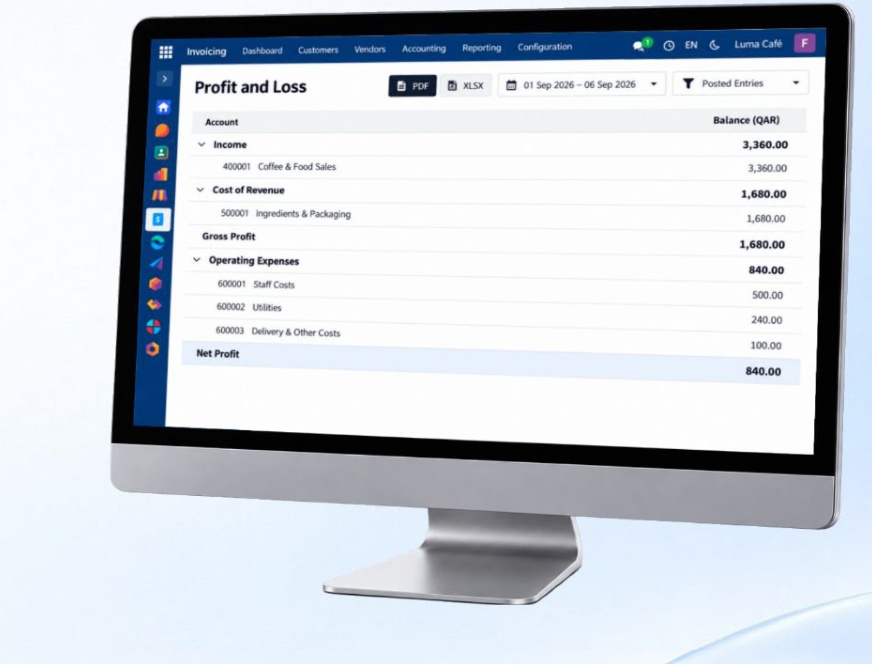
Review profit and loss, cash flow, the balance sheet, trial balance and general ledger. Compare periods, open the entries behind the figures and export reports for review.

Close the month with clear checks

Review bank matching, settlements, draft entries and depreciation before closing. Record approvals and justified exceptions, then lock the period. Reopening requires a reason, keeping changes accountable.


A clearer view of your finances.

Purchases & Expenses handles supplier orders and daily spending. Add Accounting for bank reconciliation, the general ledger and detailed financial statements.

Systemy profit and loss report

One subscription for your business

10 customer users are included per business, shared across all subscribed apps and locations. Each additional user costs QAR 200 per year.

The Point of Sale app includes 2 POS branches. Each additional POS branch costs QAR 1,000 per year. Several registers at one branch count as one branch. Inventory is optional, regardless of branch count. Customers without POS do not incur this branch charge.

Each business app includes 30 minutes of booked training and technical support per month, capped at 2 hours per business. Configuration help and how-to questions use this allowance; Systemy defect fixes do not. No carry-over. Additional time: QAR 200/hour.

Hosting and automatic backups are included in every subscription.

The subtotal for business apps and AI is capped at QAR 12,000 per year. At that amount, the complete package includes all 11 apps and AI. Additional users, POS locations, hardware and other services are charged separately.

The optional AI assistant does not add training time. AI training can use your existing allowance. The complete package includes AI and receives the same 2-hour monthly maximum.

Existing customers retain their current pricing and allowances until renewal or an agreed change.

Calculate your annual price

Subscribe through Systemy app

Download Systemy app, register, choose your apps and complete your payment in the app.

01

Download Systemy app

Install Systemy app on your phone.

02

Create your account

Register in the app to start your subscription.

03

Choose your business apps

Select the apps your business needs inside the app.

04

Complete payment

Pay for your selected subscriptions in the app.

For additional users or POS branches, contact us to arrange the additions. POS includes 2 branches; Inventory remains optional.